
Product Overview & Core Value
EpoCanvas Docs is the official technical documentation site system built for the EpoCanvas open-source ecosystem. It is built on the modern static site framework Astro 5 and Starlight, and aims to give developers a documentation platform that is professionally typeset, fast to load, easy to search, and easy to maintain.
Whether you are writing a product user manual, an API reference, or system architecture notes, EpoCanvas Docs lets writers focus on producing good Markdown content while giving readers a comfortable, natural browsing experience.
The Real Problems It Solves
In day-to-day development and technical writing, many teams run into the following problems when maintaining documentation:
- Slow page loads and high memory usage: many documentation tools ship pages with a large JavaScript runtime, which loads slowly on phones or weak networks and stutters when scrolling long articles.
- Hard to navigate long articles: most documentation sites only have a left-side menu, so when reading a multi-thousand-word technical article it is hard to quickly grasp the heading hierarchy inside the current page.
- Search depends on external services: common cloud search services such as Algolia require a separate account and crawler API keys, and fail completely in intranet environments that cannot reach external services.
- Half-finished multilingual support: many documentation sites claim to support multiple languages, but in practice only the navigation buttons are translated while article bodies stay in the original language; others return a 404 when a translation is missing, leaving readers to find content by editing the URL themselves.
EpoCanvas Docs was designed specifically to solve these real pain points.
Core Features at a Glance
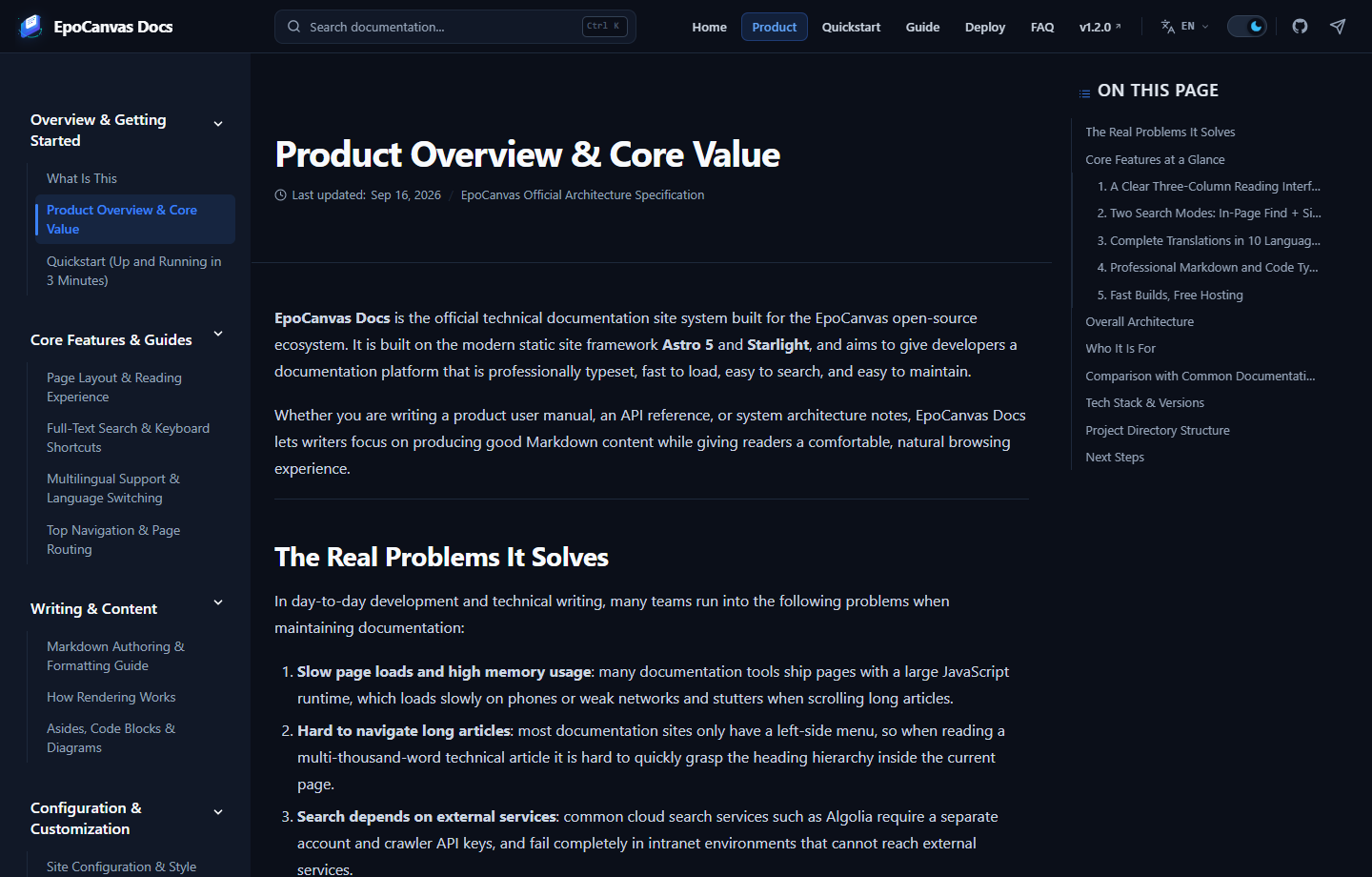
Figure: The product overview page as actually rendered. The left side shows the documentation categories, the center shows the main content, and the right side shows the auto-generated “On this page” outline, which highlights the current section as you scroll.
1. A Clear Three-Column Reading Interface
- Left navigation: organizes all documentation categories by module, with collapsible levels, and stays stable when you move between pages.
- Center content area: body text is capped at a 60rem max width with 1.68 line height, and code blocks resize to fit, which reduces fatigue during long reading sessions.
- Right outline panel: automatically pulls the
h2andh3headings from the article to build the “On this page” table of contents, highlights the current reading position as you scroll, and smooth-scrolls to any heading you click.
2. Two Search Modes: In-Page Find + Site-Wide Search
- Find on the current page: type keywords into the top search box and every match on the page is highlighted immediately, with a progress counter such as
3/9; press Enter to jump through the matches one by one. - Site-wide search dialog: press
Ctrl + K(Cmd + Kon Mac) to open the site-wide search dialog, which lists all matching documents with paragraph previews, powered by a Pagefind static index. - All search runs locally in the browser with no backend dependency, so it works even when the site is hosted on an intranet.
3. Complete Translations in 10 Languages
- Supports 10 languages — Simplified Chinese, Traditional Chinese, English, Japanese, Korean, Spanish, French, German, Russian, and Portuguese — with fully translated navigation, sidebar, and body text for every document in each language.
- Click the language button in the top-right corner to jump to the target-language version of the same article. URLs carry a language prefix (such as
/en/canvas/), so you can bookmark them or share them with colleagues who use another language. - When a page is missing a translation in a given language, that page automatically falls back to the default Chinese content instead of returning a 404 error.
4. Professional Markdown and Code Typography
- Syntax highlighting powered by Expressive Code, with filename titles on code blocks, highlighted line ranges, and diff views.
- Native support for four colored aside types (Note, Tip, Caution, Danger), with custom titles.
- Supports common Markdown extensions such as GFM tables, task lists, and strikethrough; see How Rendering Works for the full rules.
5. Fast Builds, Free Hosting
- Static compilation with Astro 5 produces pure HTML, CSS, and a small amount of on-demand JS; a full build of roughly 180 pages across all 10 languages takes about 25 seconds.
- A Cloudflare Pages deploy command is preconfigured; one command publishes the documentation online, and it automatically gets an HTTPS certificate.
Overall Architecture
To keep the documentation lightweight and easy to maintain, the system is divided into four parts by responsibility:
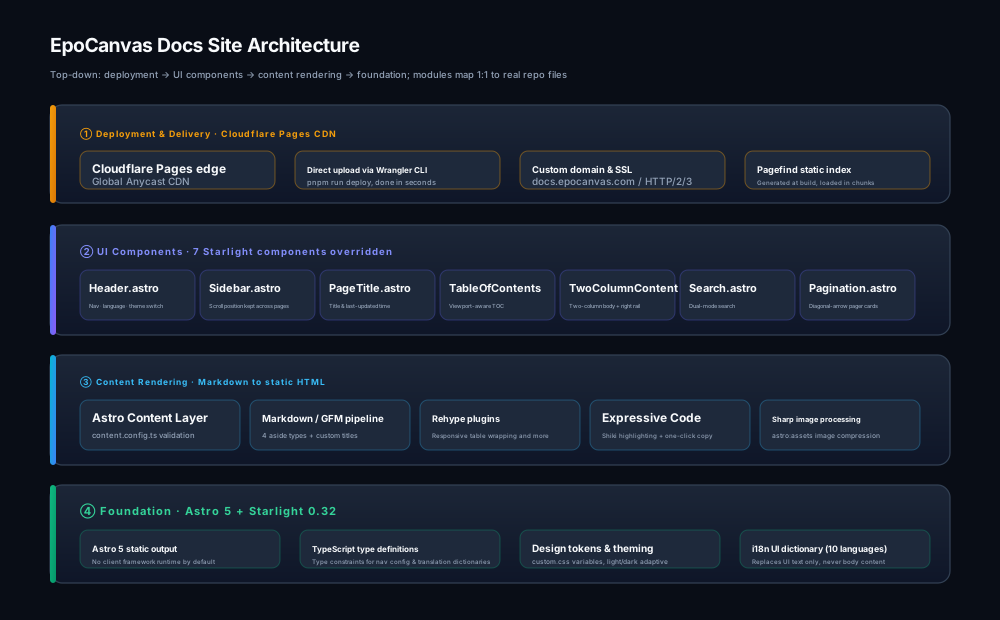
Figure: System architecture. Writers only maintain the Markdown content sources; every other step is handled automatically.
- Base and styling: built on the Astro 5 static core, with design variables defined in
src/styles/custom.css; the light and dark themes share the same set of variable names. - Content sources: all documentation lives in the
src/content/docs/directory, written in plain Markdown (.md) or in MDX (.mdx) that can embed components. - UI components: the top bar, sidebar, on-page table of contents, and search dialog are customized by overriding Starlight’s native components.
- Distribution and access: build output is stored in the
dist/directory and hosted on Cloudflare Pages, served from the nearest global CDN node.
Who It Is For
EpoCanvas Docs fits the following scenarios:
- Official documentation site for open-source projects: product manuals, API references, and architecture notes, all handled in one repository;
- Team internal knowledge base: fully static with no external service dependencies, and search works fully even on an intranet;
- Personal technical blog-style docs: write only Markdown, skip front-end engineering, and publish with one command.
It is not suited for scenarios that require login authentication, comments and interaction, or real-time data display — a fully static site has no backend, so these needs require separate services.
Comparison with Common Documentation Tools
| Feature | EpoCanvas Docs | Docusaurus | VitePress | GitBook Commercial |
|---|---|---|---|---|
| Underlying technology | Astro 5 + Starlight | React 18 | Vue 3 + Vite | Closed-source SaaS platform |
| Search mechanism | Pagefind local static index | Depends on the Algolia cloud service | Minisearch in-memory search | Built-in backend search |
| Layout | Three columns (left menu + center content + right TOC) | Requires plugin configuration to change | Two/three columns by default | Fixed two columns |
| Deployment | Direct upload to Cloudflare Pages | S3 / Vercel / GitHub | GitHub Pages | Platform’s proprietary hosting |
| Autonomy | 100% open source, full source in your hands | 100% open source | 100% open source | Closed source, many paid features |
Tech Stack & Versions
The tech stack actually used by the current version (as reflected in the build output):
| Component | Version | Purpose |
|---|---|---|
| Astro | v5.18.2 | Static site core; handles build and routing |
| Starlight | v0.32.6 | Documentation framework; provides the layout skeleton and content processing |
| Expressive Code | Bundled with Starlight | Code block highlighting, title bars, line highlighting |
| Pagefind | Integrated via @pagefind/default-ui 1.5.2 | Generates the static search index at build time |
| Wrangler | v4.131.0 | Official Cloudflare CLI; runs the deployment |
| Runtime | Node.js 18.20.8 / 20.3+ / 22+, pnpm 10 | Local development and builds; pnpm run deploy needs Node.js 22 or newer because of wrangler |
When upgrading dependencies, also read the regression testing notes in UI Components & Custom Development.
Project Directory Structure
The project’s code is organized as follows, with a clear division of responsibilities between directories:
epocanvas-docs/├── public/ # Static assets (put images and vector icons here)│ └── images/canvas/ # UI screenshots and the system architecture vector diagram├── src/│ ├── components/starlight/ # Customized page components (top bar, sidebar, on-page TOC, search dialog, etc.)│ ├── config/navigation.ts # Top navigation bar configuration (edit here to add or remove menu items)│ ├── content/docs/ # Where the documentation Markdown files live│ │ ├── index.mdx # Documentation site landing page│ │ ├── canvas/ # Chapter documents (Simplified Chinese, the default language)│ │ └── en/ ja/ ... # Full translation directories for the other 9 languages│ ├── styles/custom.css # Global styles and theme color variables│ ├── utils/i18n.ts # UI string dictionary and language list│ └── pages/404.astro # custom 404 page, message follows the browser language├── scripts/ # cache invalidation, i18n / image / anchor checks and the screenshot pipeline├── astro.config.mjs # Main site configuration file (title, language list, and sidebar are configured here)└── package.json # Project dependencies and run scriptsNext Steps
- Want to run the project locally? Read Quickstart (Up and Running in 3 Minutes).
- Want to understand the page layout and how to use it? Read Page Layout & Reading Experience.
- Ready to write new documentation? Read the Markdown Authoring & Formatting Guide and How Rendering Works.